
Course Schedule
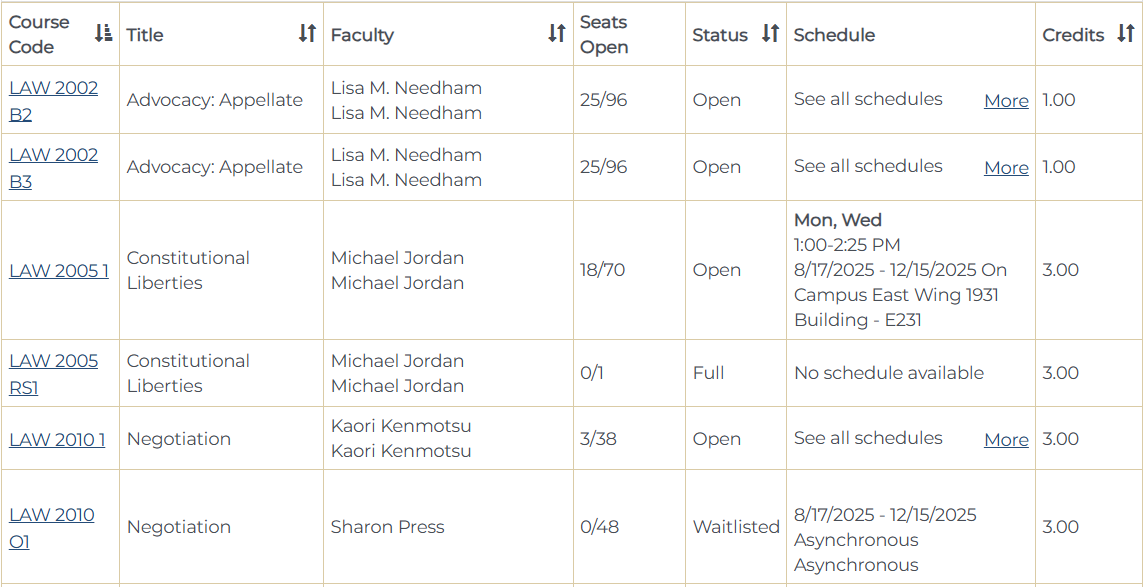
The course search function on the My Academics page of the Student Portal allows students to search for courses and see the relevant details for each course. Performing a course search in the registration application of the Student Portal will produce results similar to the following:
Course Schedule Elements
1. Course Code. This field contains information about the course type and modality and is composed of several components:
- Course type, indicated by the prefix:
- ABR: study abroad courses
- CLI: clinics
- CMP: competitions
- EXT: externships
- IND: independent work
- LAW: standard law courses
- PUB: publications/journals
- SEM: seminars
- Course code, e.g., 2010, 3000.
- Course section and modality, indicated by the suffix (see here for information on modality and credit types):
- A number without a latter (e.g., “1”, “2”): in person
- “B” (e.g., “B1”): Blended
- “O” (e.g., “O2”): online asynchronous
- “RS” (e.g., :RS1″): remote synchronous
- “HC” (e.g., “HC1”): Hyflex on campus
- “HR” (e.g., “HR1”): Hyflex remote
2. Title: course name
3. Faculty: the assigned professor(s)
4. Seats Open: the number of seats available/the maximum number of seats available for the class
5. Status: indicates if the course is open, full, or waitlisted
6. Schedule: lists any required synchronous on-campus or remote meeting times
7. Credits: credit value of the course.
Course Schedule Details
Clicking on the Course Code hyperlink on the schedule will provide more details about the course, including a description that lists any prerequisites or any other special instructions related to registration. Students should always read the course description in case there is important registration information.
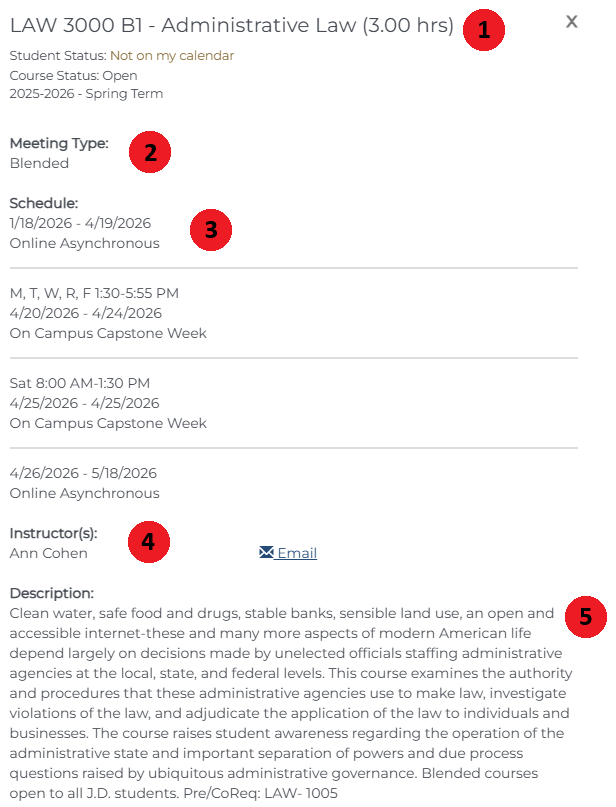
1. Course information: code – title (credit hours)
2. Meeting Type: the modality of the course
3. Schedule: provides the meeting times and location if applicable. There can be multiple rows in a given schedule, and all rows are relevant. A course that is Blended, for example, will have rows for asynchronous times and a row for its capstone.
4. Instructor(s)
5. Description: will sometimes contain important registration information and any prerequisites.